<?xml version="1.0" encoding="utf-8"?><feed xmlns="http://www.w3.org/2005/Atom" ><generator uri="https://jekyllrb.com/" version="3.10.0">Jekyll</generator><link href="https://whenboy07.github.io/feed.xml" rel="self" type="application/atom+xml" /><link href="https://whenboy07.github.io/" rel="alternate" type="text/html" /><updated>2026-03-23T20:02:18-07:00</updated><id>https://whenboy07.github.io/feed.xml</id><title type="html">Wenbo Ding</title><author><name>Wenbo Ding</name><email>ding.wenbo@sz.tsinghua.edu.cn</email></author><entry><title type="html">Wireshark</title><link href="https://whenboy07.github.io/posts/2022/01/blog-post-wireshark" rel="alternate" type="text/html" title="Wireshark" /><published>2022-01-25T00:00:00-08:00</published><updated>2022-01-25T00:00:00-08:00</updated><id>https://whenboy07.github.io/posts/2022/01/blog-post-wireshark</id><content type="html" xml:base="https://whenboy07.github.io/posts/2022/01/blog-post-wireshark"><![CDATA[<p>This paper summarizes resources for Wireshark.</p>

<aside class="sidebar__left">
<nav class="toc">
    <header><h4 class="nav__title"><i class="fas fa-file-alt"></i> On This Page</h4></header>
<ul class="toc__menu" id="markdown-toc">
  <li><a href="#overview" id="markdown-toc-overview">Overview</a></li>
  <li><a href="#tutorial" id="markdown-toc-tutorial">Tutorial</a>    <ul>
      <li><a href="#wireshark-for-wifi" id="markdown-toc-wireshark-for-wifi">Wireshark for WiFi</a></li>
      <li><a href="#wireshark-for-ieee-802154" id="markdown-toc-wireshark-for-ieee-802154">Wireshark for IEEE 802.15.4</a></li>
      <li><a href="#wireshark-for-bluetooth" id="markdown-toc-wireshark-for-bluetooth">Wireshark for Bluetooth</a></li>
      <li><a href="#wireshark-for-lorawan" id="markdown-toc-wireshark-for-lorawan">Wireshark for LoRaWAN</a></li>
    </ul>
  </li>
</ul>

  </nav>
</aside>

<h1 id="overview">Overview</h1>

<ul>
  <li><a href="https://www.wireshark.org/" target="_blank">Download Link</a></li>
  <li><a href="https://www.wireshark.org/docs/wsug_html_chunked/index.html" target="_blank">Wireshark User Guide</a>
    <blockquote>
      <p>Wireshark is a network packet analyzer. A network packet analyzer presents captured packet data in as much detail as possible.
You could think of a network packet analyzer as a measuring device for examining what’s happening inside a network cable, just like an electrician uses a voltmeter for examining what’s happening inside an electric cable (but at a higher level, of course).</p>
    </blockquote>
  </li>
</ul>

<h1 id="tutorial">Tutorial</h1>
<h2 id="wireshark-for-wifi">Wireshark for WiFi</h2>
<ul>
  <li><a href="https://documentation.meraki.com/General_Administration/Tools_and_Troubleshooting/Analyzing_Wireless_Packet_Captures" target="_blank">Analyzing Wireless Packet Captures</a></li>
</ul>

<h2 id="wireshark-for-ieee-802154">Wireshark for IEEE 802.15.4</h2>
<ul>
  <li><a href="https://wiki.wireshark.org/IEEE_802.15.4" target="_blank">Wireshark for IEEE 802.15.4</a></li>
</ul>

<h2 id="wireshark-for-bluetooth">Wireshark for Bluetooth</h2>
<ul>
  <li><a href="https://wiki.wireshark.org/Bluetooth" target="_blank">Wireshark for Bluetooth</a></li>
</ul>

<h2 id="wireshark-for-lorawan">Wireshark for LoRaWAN</h2>
<ul>
  <li><a href="https://github.com/ltn22/LoRaWAN-Wireshark-Dissector" target="_blank">LoRaWAN Wireshark dissector</a></li>
</ul>]]></content><author><name>Wenbo Ding</name><email>ding.wenbo@sz.tsinghua.edu.cn</email></author><category term="Resources" /><category term="Wireshark" /><category term="Wireshark" /><summary type="html"><![CDATA[This paper summarizes resources for Wireshark.]]></summary></entry><entry><title type="html">Machine Learning and Deep Learning for Beginners</title><link href="https://whenboy07.github.io/posts/2021/09/blog-post-ml-dl/" rel="alternate" type="text/html" title="Machine Learning and Deep Learning for Beginners" /><published>2021-09-14T00:00:00-07:00</published><updated>2021-09-14T00:00:00-07:00</updated><id>https://whenboy07.github.io/posts/2021/09/blog-post-ml-dl</id><content type="html" xml:base="https://whenboy07.github.io/posts/2021/09/blog-post-ml-dl/"><![CDATA[<p>This paper summarizes resources for  machine learning and deep learning for beginners.</p>

<aside class="sidebar__left">
<nav class="toc">
    <header><h4 class="nav__title"><i class="fas fa-file-alt"></i> On This Page</h4></header>
<ul class="toc__menu" id="markdown-toc">
  <li><a href="#overview" id="markdown-toc-overview">Overview</a></li>
  <li><a href="#machine-learning" id="markdown-toc-machine-learning">Machine Learning</a></li>
  <li><a href="#deep-learning-tutorials" id="markdown-toc-deep-learning-tutorials">Deep Learning Tutorials</a></li>
  <li><a href="#convolutional-neural-networks-cnn" id="markdown-toc-convolutional-neural-networks-cnn">Convolutional Neural Networks (CNN)</a>    <ul>
      <li><a href="#what-is-convolutional-neural-networks-cnn" id="markdown-toc-what-is-convolutional-neural-networks-cnn">What is Convolutional Neural Networks (CNN)</a></li>
      <li><a href="#cnn-examples" id="markdown-toc-cnn-examples">CNN Examples</a></li>
      <li><a href="#common-cnn-architecture" id="markdown-toc-common-cnn-architecture">Common CNN Architecture</a>        <ul>
          <li><a href="#alexnet" id="markdown-toc-alexnet">AlexNet</a></li>
        </ul>
      </li>
    </ul>
  </li>
  <li><a href="#few-shot-learning" id="markdown-toc-few-shot-learning">Few Shot Learning</a></li>
  <li><a href="#development-tool" id="markdown-toc-development-tool">Development Tool</a>    <ul>
      <li><a href="#python" id="markdown-toc-python">Python</a></li>
      <li><a href="#keras" id="markdown-toc-keras">Keras</a></li>
      <li><a href="#matlab" id="markdown-toc-matlab">Matlab</a></li>
      <li><a href="#code-snippet" id="markdown-toc-code-snippet">Code Snippet</a></li>
    </ul>
  </li>
  <li><a href="#online-resources" id="markdown-toc-online-resources">Online Resources</a></li>
</ul>

  </nav>
</aside>

<h1 id="overview">Overview</h1>

<h1 id="machine-learning">Machine Learning</h1>
<ul>
  <li><a href="https://elitedatascience.com/python-machine-learning-tutorial-scikit-learn" target="_blank">Python Machine Learning Tutorial, Scikit-Learn</a></li>
  <li><a href="https://www.kaggle.com/pranathichunduru/svm-for-multiclass-classification/" target="_blank">Training Support Vector Machines for Multiclass Classification</a></li>
</ul>

<h1 id="deep-learning-tutorials">Deep Learning Tutorials</h1>
<ul>
  <li><a href="https://machinelearningmastery.com/learning-rate-for-deep-learning-neural-networks/" target="_blank">How to Configure the Learning Rate When Training Deep Learning Neural Networks</a></li>
</ul>

<h1 id="convolutional-neural-networks-cnn">Convolutional Neural Networks (CNN)</h1>
<h2 id="what-is-convolutional-neural-networks-cnn">What is Convolutional Neural Networks (CNN)</h2>
<ul>
  <li><a href="https://towardsdatascience.com/a-comprehensive-guide-to-convolutional-neural-networks-the-eli5-way-3bd2b1164a53" target="_blank">A Comprehensive Guide to Convolutional Neural Networks</a></li>
  <li><a href="https://uk.mathworks.com/help/deeplearning/ug/layers-of-a-convolutional-neural-network.html" target="_blank">Matlab, Explanation of Different Layers of Convolutional Neural Networks</a></li>
</ul>

<h2 id="cnn-examples">CNN Examples</h2>
<ul>
  <li><a href="https://towardsdatascience.com/building-a-convolutional-neural-network-cnn-in-keras-329fbbadc5f5" target="_blank">Building a Convolutional Neural Network (CNN) in Keras</a></li>
  <li><a href="https://machinelearningmastery.com/tutorial-first-neural-network-python-keras/" target="_blank">Your First Deep Learning Project in Python with Keras Step-By-Step</a></li>
  <li><a href="https://machinelearningmastery.com/cnn-models-for-human-activity-recognition-time-series-classification/" target="_blank">How to Develop 1D Convolutional Neural Network Models for Human Activity Recognition</a></li>
</ul>

<h2 id="common-cnn-architecture">Common CNN Architecture</h2>
<ul>
  <li><a href="https://towardsdatascience.com/illustrated-10-cnn-architectures-95d78ace614d#e276" target="_blank">Illustrated: 10 CNN Architectures</a>: LeNet-5, AlexNet, VGG-16, Inception-v1, Inception-v3,  ResNet-50, Xception, Inception-v4, Inception-ResNets, ResNeXt-50</li>
</ul>

<h3 id="alexnet">AlexNet</h3>
<ul>
  <li><a href="https://www.learnopencv.com/understanding-alexnet/" target="_blank">Understanding AlexNet</a></li>
  <li><a href="https://towardsdatascience.com/implementing-alexnet-cnn-architecture-using-tensorflow-2-0-and-keras-2113e090ad98" target="_blank">Implementing AlexNet CNN Architecture Using TensorFlow 2.0+ and Keras</a></li>
</ul>

<h1 id="few-shot-learning">Few Shot Learning</h1>
<ul>
  <li><a href="https://www.analyticsvidhya.com/blog/2021/05/an-introduction-to-few-shot-learning/" target="_blank">An Introduction to Few-Shot Learning
</a></li>
  <li><a href="https://neptune.ai/blog/understanding-few-shot-learning-in-computer-vision" target="_blank">Understanding Few-Shot Learning in Computer Vision – What You Need to Know</a></li>
</ul>

<h1 id="development-tool">Development Tool</h1>
<h2 id="python">Python</h2>
<p>I strongly recommend installing <a href="https://docs.anaconda.com/anaconda/install/" target="_blank">Anaconda Distribution</a>.</p>

<h2 id="keras">Keras</h2>
<ul>
  <li><a href="https://keras.io/getting-started/sequential-model-guide/" target="_blank">Getting started with the Keras Sequential model</a></li>
  <li><a href="https://keras.io/examples/vision/mnist_convnet/" target="_blank">Simple MNIST convnet</a></li>
</ul>

<h2 id="matlab">Matlab</h2>
<ul>
  <li><a href="https://uk.mathworks.com/solutions/deep-learning/convolutional-neural-network.html" target="_blank">Matlab, Convolutional Neural Networks</a></li>
  <li><a href="https://www.mathworks.com/solutions/deep-learning/examples/training-a-model-from-scratch.html" target="_blank">Matlab, Training a Model from Scratch</a></li>
</ul>

<h2 id="code-snippet">Code Snippet</h2>
<ul>
  <li>Check the installed packages
    <div class="language-plaintext highlighter-rouge"><div class="highlight"><pre class="highlight"><code>conda list
</code></pre></div>    </div>
  </li>
  <li>Install a particular tensorflow version using conda
    <div class="language-plaintext highlighter-rouge"><div class="highlight"><pre class="highlight"><code>conda install -c conda-forge tensorflow=1.13
</code></pre></div>    </div>
  </li>
</ul>

<h1 id="online-resources">Online Resources</h1>
<ul>
  <li>CS231n: Convolutional Neural Networks for Visual Recognition at Stanford University <a href="http://cs231n.stanford.edu/" target="_blank">link</a></li>
  <li>A summary of resources <a href="https://towardsdatascience.com/convolutional-neural-network-a-step-by-step-guide-a8b4c88d6943" target="_blank">link</a></li>
  <li><a href="http://d2l.ai/index.html" target="_blank">Book Dive into Deep Learning</a></li>
</ul>]]></content><author><name>Wenbo Ding</name><email>ding.wenbo@sz.tsinghua.edu.cn</email></author><category term="Resources" /><category term="Deep Learning" /><category term="Machine Learning" /><category term="Deep Learning" /><category term="Machine Learning" /><category term="Python" /><summary type="html"><![CDATA[This paper summarizes resources for machine learning and deep learning for beginners.]]></summary></entry><entry><title type="html">Resources for Bluetooth Low Energy</title><link href="https://whenboy07.github.io/posts/2020/11/blog-post-bluetooth/" rel="alternate" type="text/html" title="Resources for Bluetooth Low Energy" /><published>2020-11-07T00:00:00-08:00</published><updated>2020-11-07T00:00:00-08:00</updated><id>https://whenboy07.github.io/posts/2020/11/blog-post-bluetooth</id><content type="html" xml:base="https://whenboy07.github.io/posts/2020/11/blog-post-bluetooth/"><![CDATA[<p>This page summarizes resources for Classic Bluetooth and Bluetooth Low Energy. It is still under active update.</p>

<aside class="sidebar__left">
<nav class="toc">
    <header><h4 class="nav__title"><i class="fas fa-file-alt"></i> On This Page</h4></header>
<ul class="toc__menu" id="markdown-toc">
  <li><a href="#overview" id="markdown-toc-overview">Overview</a></li>
  <li><a href="#network-architecture" id="markdown-toc-network-architecture">Network Architecture</a></li>
  <li><a href="#protocol-overview" id="markdown-toc-protocol-overview">Protocol Overview</a></li>
  <li><a href="#physical-layer" id="markdown-toc-physical-layer">Physical Layer</a>    <ul>
      <li><a href="#preamble" id="markdown-toc-preamble">Preamble</a></li>
    </ul>
  </li>
  <li><a href="#link-layer" id="markdown-toc-link-layer">Link Layer</a>    <ul>
      <li><a href="#advertising-channel" id="markdown-toc-advertising-channel">Advertising Channel</a></li>
      <li><a href="#data-channel" id="markdown-toc-data-channel">Data Channel</a></li>
      <li><a href="#packet-type" id="markdown-toc-packet-type">Packet Type</a></li>
      <li><a href="#discovery-process" id="markdown-toc-discovery-process">Discovery Process</a></li>
      <li><a href="#connection-process" id="markdown-toc-connection-process">Connection Process</a></li>
    </ul>
  </li>
  <li><a href="#bluetooth-stack-and-development-kit" id="markdown-toc-bluetooth-stack-and-development-kit">Bluetooth Stack and Development Kit</a>    <ul>
      <li><a href="#linux" id="markdown-toc-linux">Linux</a></li>
      <li><a href="#micropython" id="markdown-toc-micropython">Micropython</a></li>
      <li><a href="#texas-instruments" id="markdown-toc-texas-instruments">Texas Instruments</a></li>
      <li><a href="#scapy-for-bluetooth" id="markdown-toc-scapy-for-bluetooth">Scapy for Bluetooth</a></li>
      <li><a href="#matlab-bluetooth-support" id="markdown-toc-matlab-bluetooth-support">Matlab Bluetooth Support</a></li>
    </ul>
  </li>
</ul>

  </nav>
</aside>

<h1 id="overview">Overview</h1>
<p>There is some confusion about the Bluetooth. Generally speaking, Bluetooth 1.0 - 3.0 includes classic Bluetooth. Bluetooth 4.0 starts to use Bluetooth Low Energy (BLE). A brief introduction about their difference can be found at <a href="https://www.bluetooth.com/learn-about-bluetooth/bluetooth-technology/radio-versions/" target="_blank">link1</a>, <a href="https://blog.nordicsemi.com/getconnected/the-difference-between-classic-bluetooth-and-bluetooth-low-energy" target="_blank">link2</a> and <a href="https://www.semiconductorstore.com/blog/2018/Bluetooth-1-0-vs-2-0-vs-3-0-vs-4-0-vs-5-0-How-They-Differ-Symmetry-Blog/3147/" target="_blank">link3</a>.</p>

<p>New features of Bluetooth 5 can be found <a href="https://www.bluetooth.com/bluetooth-resources/bluetooth-5-go-faster-go-further/" target="_blank">here</a>. The full and latest specification, v5.2 (released in 2019) can be downloaded <a href="https://www.bluetooth.com/specifications/bluetooth-core-specification/" target="_blank">here</a>.</p>

<p>Unless otherwise highlighted, the following descriptions apply to BLE, which might not be correct for classic Bluetooth.</p>

<h1 id="network-architecture">Network Architecture</h1>
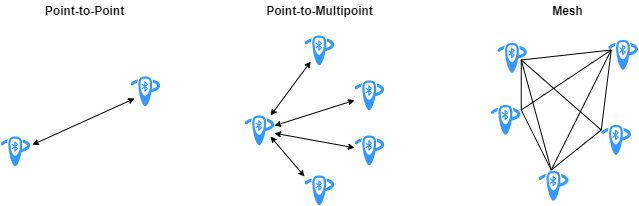
<ul>
  <li>Point-to-Point and Point-to-Multipoint Connection Topology (Both Bluetooth classic and BLE)</li>
  <li>Broadcast Connection Topology (BLE only)</li>
  <li>Mesh Connection Topology (BLE only)
<br />
<img align="center" width="1000" src="https://whenboy07.github.io/images/bluetooth/bluetooth_topologies.png" alt="..." />
<br />
Figure from <a href="https://uk.mathworks.com/help/comm/ug/bluetooth-mesh-networking.html" target="_blank">https://uk.mathworks.com/help/comm/ug/bluetooth-mesh-networking.html</a>.</li>
</ul>

<h1 id="protocol-overview">Protocol Overview</h1>
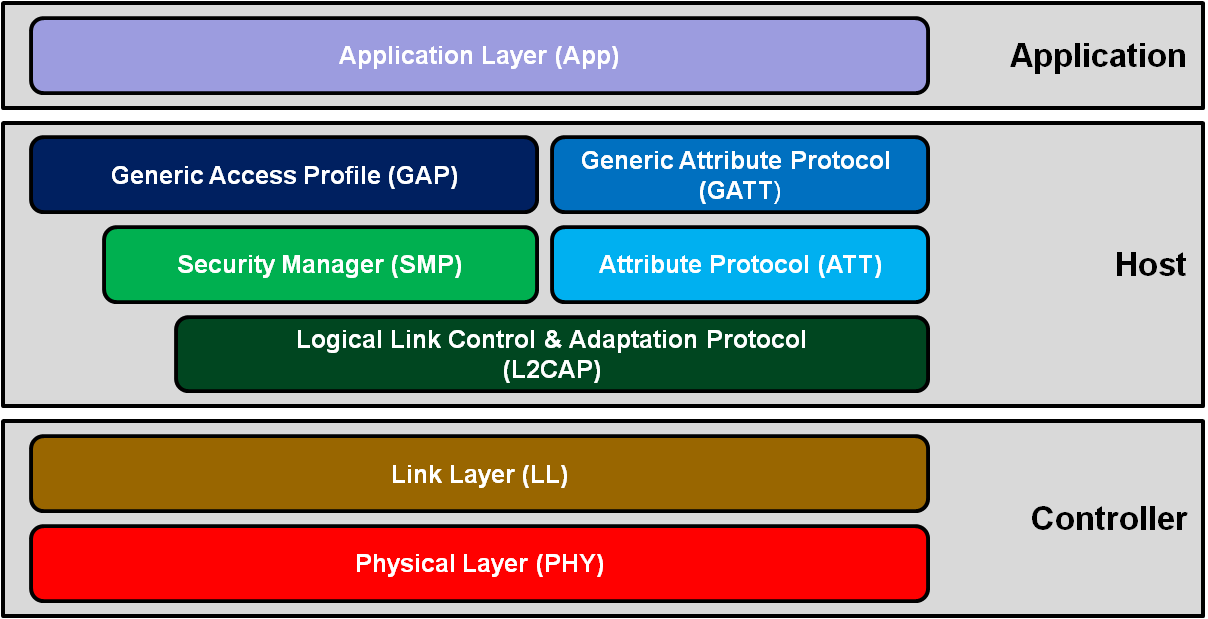
<p>Visit <a href="https://uk.mathworks.com/help/comm/ug/bluetooth-protocol-stack.html" target="_blank">MATLAB Bluetooth Protocol Stack</a> for a detailed introduction about the Bluetooth and BLE protocol, and a mapping between them and the OSI model.
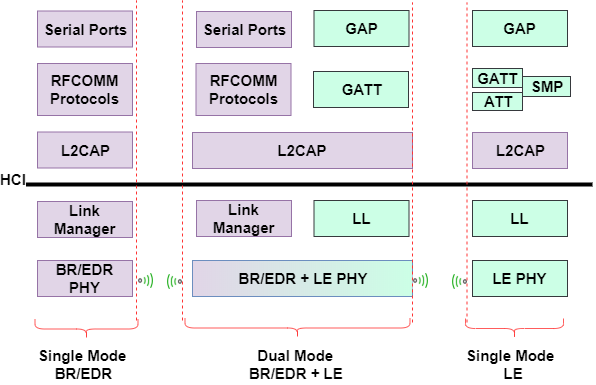
<br />
<img align="center" width="1000" src="https://whenboy07.github.io/images/bluetooth/ble-blutooth-protocol.png" alt="..." />
<br />
Figure from <a href="https://uk.mathworks.com/help/comm/ug/bluetooth-protocol-stack.html" target="_blank">https://uk.mathworks.com/help/comm/ug/bluetooth-protocol-stack.html</a>.</p>

<p>Some brief introduction of the protocol can be found at the <a href="https://microchipdeveloper.com/wireless:ble-introduction" target="_blank">Microchip Developer Center</a>. The BLE protocol stack consists of</p>
<ul>
  <li>Controller (Physical Layer and Link Layer)</li>
  <li>Host</li>
  <li>Application</li>
</ul>

<p><br />
<img align="center" width="1000" src="https://whenboy07.github.io/images/bluetooth/ble-protocol-stack.png" alt="..." />
<br />
Figure from <a href="https://microchipdeveloper.com/wireless:ble-introduction" target="_blank">https://microchipdeveloper.com/wireless:ble-introduction</a>.</p>

<h1 id="physical-layer">Physical Layer</h1>
<p>Some key features of the BLE physical layer</p>
<ul>
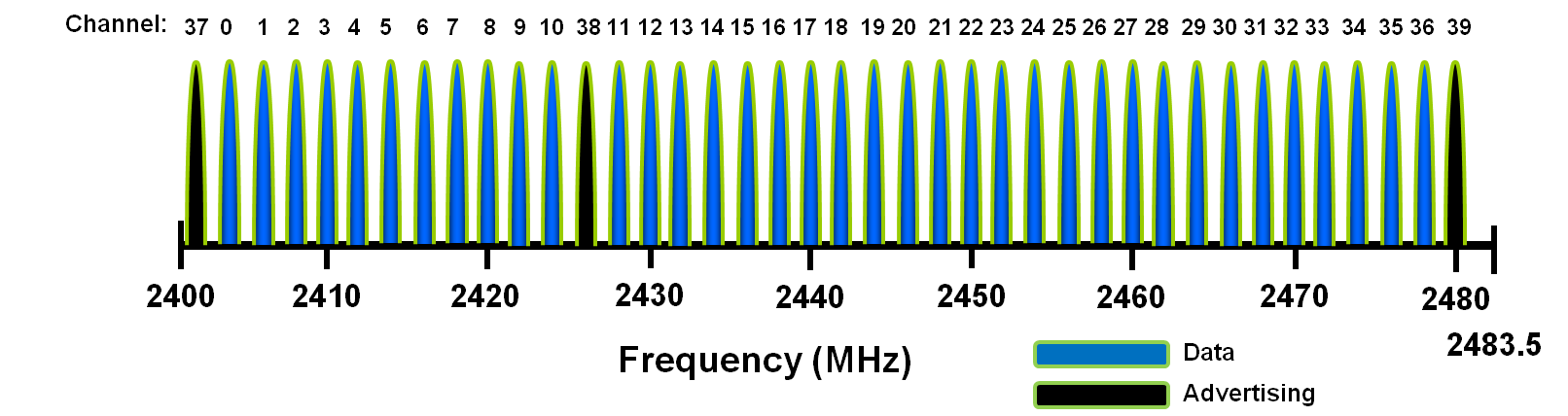
  <li>2.4GHz ISM band. The band between 2.402 GHz to 2.4835 GHz is divided into 40 channels with 2 MHz channel spacing, $f_k = 2402 + k*2 MHz, k = 0, 1, …, 39$</li>
  <li>The 40 channels are divided into advertising channels (Ch. 37, 38, and 39) and 37 data channels (Ch. 0-36).</li>
  <li>Gaussian Frequency-Shift Keying (GFSK).</li>
  <li>Adaptive Frequency Hopping for data channels. The channel selection algorithms can be found in Section 4.5.8 of Part B vol. 6. There are two algorithms defined and the algorithm#1 selects the channel as 
$f_{n+1} = (f_n + hop)$ mod 37,
where hop ranges from 5-16.</li>
</ul>

<p><br />
<img align="center" width="1000" src="https://whenboy07.github.io/images/bluetooth/ble-phy-channel-assignment.png" alt="..." title="title" />
<br />
Figure from <a href="https://microchipdeveloper.com/wireless:ble-introduction" target="_blank">https://microchipdeveloper.com/wireless:ble-introduction</a>.</p>

<h2 id="preamble">Preamble</h2>
<p>The preamble defined in BLE v5.2:</p>
<ul>
  <li>LE IM packets (8 bits): 10101101, or 01010101</li>
  <li>LE 2M packets (16 bits): 1010110110101101, or 0101010101010101 
Preamble is used for frequency synchronization, symbol timing and automatic gain control. Visit Page 2865 Section 2.1.1 Vol 6, Part B of the <a href="https://www.bluetooth.com/specifications/bluetooth-core-specification/" target="_blank">Bluetooth Core Specification v5.2</a>.</li>
</ul>

<h1 id="link-layer">Link Layer</h1>
<ul>
  <li>Advertising and Scanning</li>
  <li>Connection</li>
  <li>Network Topology - Piconet</li>
  <li>Security - AES - CCM</li>
</ul>

<h2 id="advertising-channel">Advertising Channel</h2>
<p>Channel 37, 38 and 39</p>
<ul>
  <li>Device Discovery</li>
  <li>Connection Establishment</li>
  <li>Broadcast Transmissions</li>
</ul>

<h2 id="data-channel">Data Channel</h2>
<p>Channel 0-36</p>
<ul>
  <li>Data transmissions</li>
  <li>Frequency hopping is used to select different channels.</li>
</ul>

<h2 id="packet-type">Packet Type</h2>
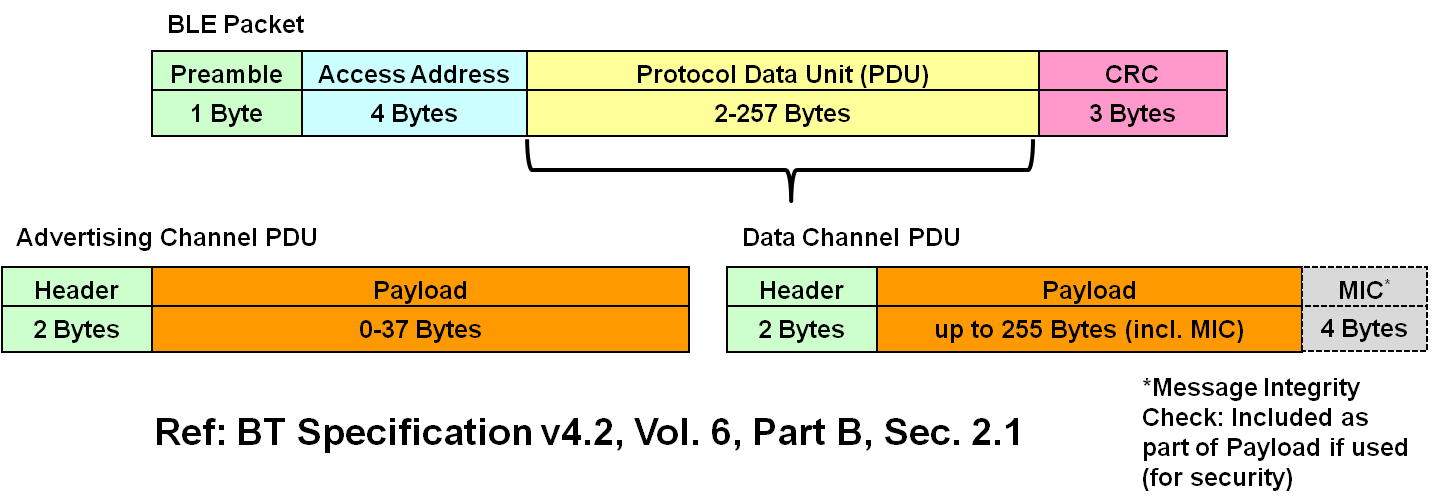
<p>The same packet format for both</p>
<ul>
  <li>Advertising channel packets</li>
  <li>Data channel packets</li>
</ul>

<p><br />
<img align="center" width="1000" src="https://whenboy07.github.io/images/bluetooth/ble-packet-format-top-level.png" alt="BLE Packet Type." title="BLE Packet Type." />
<br />
BLE Packet Type. Figure from <a href="https://microchipdeveloper.com/wireless:ble-link-layer-packet-types" target="_blank">https://microchipdeveloper.com/wireless:ble-link-layer-packet-types</a></p>

<h2 id="discovery-process">Discovery Process</h2>
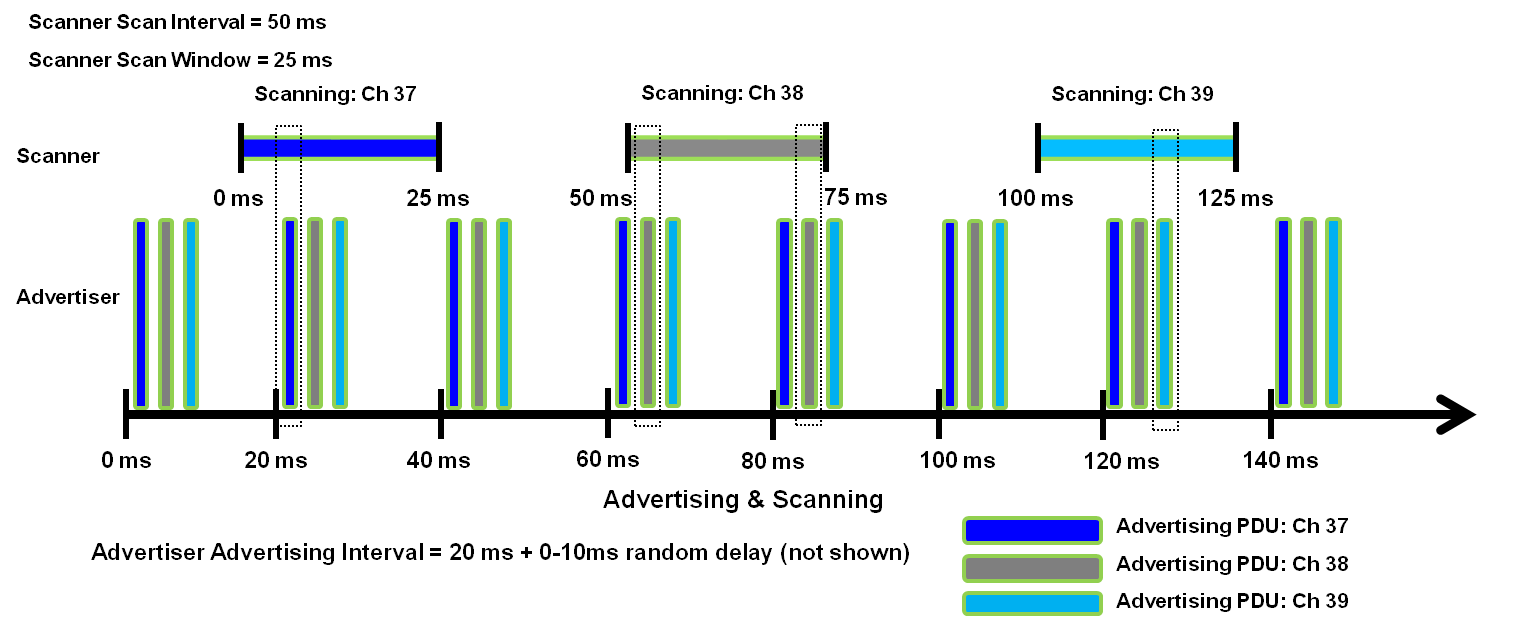
<ul>
  <li>Advertising interval: 20 ms</li>
  <li>Scan interval: 50 ms</li>
  <li>Scan window: 25 ms</li>
</ul>

<p><br />
<img align="center" width="1000" src="https://whenboy07.github.io/images/bluetooth/ble-advertising-and-scanning.png" alt="Advertising and Scanning." title="Advertising and Scanning." />
<br />
Advertising and Scanning. Figure from <a href="https://microchipdeveloper.com/wireless:ble-link-layer-discovery" target="_blank">https://microchipdeveloper.com/wireless:ble-link-layer-discovery</a></p>

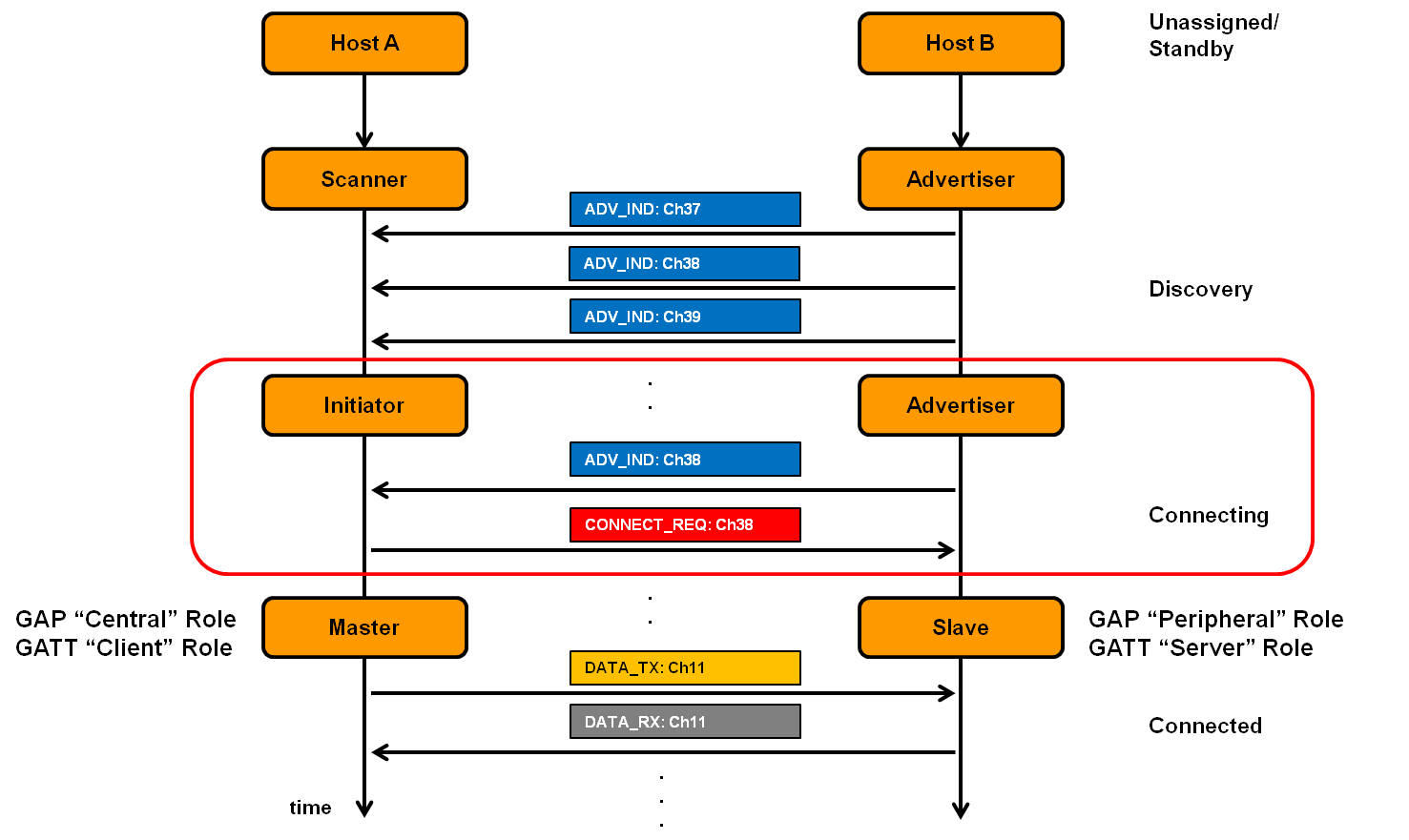
<h2 id="connection-process">Connection Process</h2>
<p><br />
<img align="center" width="1000" src="https://whenboy07.github.io/images/bluetooth/ble-connecting-phase.png" alt="Connection establishment." title="Connection establishment." />
<br />
Connection establishment. Figure from <a href="https://microchipdeveloper.com/wireless:ble-link-layer-connections" target="_blank">https://microchipdeveloper.com/wireless:ble-link-layer-connections</a></p>

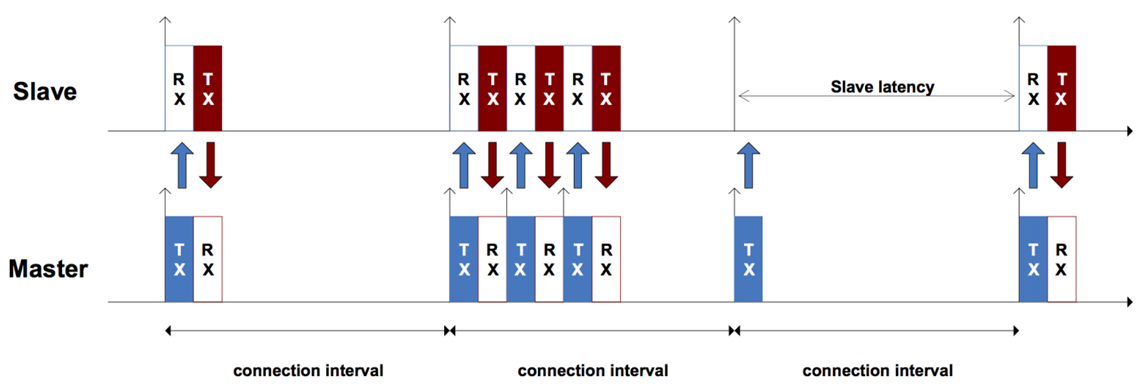
<p><br />
<img align="center" width="1000" src="https://whenboy07.github.io/images/bluetooth/ble-connected-phase.png" alt="ble-connected-phase." title="ble-connected-phase." />
<br />
Connected phase. Figure from <a href="https://microchipdeveloper.com/wireless:ble-link-layer-connections" target="_blank">https://microchipdeveloper.com/wireless:ble-link-layer-connections</a></p>

<h1 id="bluetooth-stack-and-development-kit">Bluetooth Stack and Development Kit</h1>
<h2 id="linux">Linux</h2>
<ul>
  <li>C language: <a href="http://www.bluez.org/" target="_blank">BlueZ</a>. Check <a href="https://people.csail.mit.edu/albert/bluez-intro/index.html" target="_blank">An Introduction to Bluetooth Programming</a> about its usage.</li>
  <li>Python: <a href="https://github.com/IanHarvey/bluepy" target="_blank">bluepy</a>.</li>
</ul>

<h2 id="micropython">Micropython</h2>
<ul>
  <li><a href="https://docs.micropython.org/en/latest/library/ubluetooth.html" target="_blank">ubluetooth library</a></li>
  <li><a href="https://docs.pycom.io/firmwareapi/pycom/network/bluetooth/" target="_blank">Pycom devices</a></li>
</ul>

<p>Note: The module is still under development and its classes, functions, methods and constants are subject to change. It only supports the basic BLE functions.</p>

<h2 id="texas-instruments">Texas Instruments</h2>
<ul>
  <li><a href="https://www.ti.com/tool/BLE-STACK" target="_blank">TI BLE SDK</a> support Bluetooth 4.2 and Bluetooth 5.</li>
  <li><a href="http://software-dl.ti.com/lprf/simplelink_cc2640r2_latest/docs/blestack/ble_user_guide/doxygen/ble/html/index.html">TI BLE-Stack for Bluetooth 4.2 API Documentation  3.01.00.07</a></li>
  <li><a href="http://software-dl.ti.com/lprf/simplelink_cc26x2_latest/docs/ble5stack/ble_user_guide/html/ble-stack-5.x-guide/index-cc26x2.html" target="_blank"> SimpleLink™ CC26x2 SDK BLE5-Stack User’s Guide</a>.</li>
  <li><a href="http://software-dl.ti.com/simplelink/esd/simplelink_cc13x2_26x2_sdk/4.20.01.04/exports/docs/ble5stack/ble_user_guide/html/ble-stack-5.x-guide/index-cc13x2_26x2.html" target="_blank">SimpleLink™ CC13x2 / CC26x2 SDK BLE5-Stack User’s Guide</a>.</li>
  <li>Supported TI devices can be found <a href="https://www.ti.com/wireless-connectivity/simplelink-solutions/bluetooth-low-energy/overview/overview.html" target="_blank">here</a>.</li>
</ul>

<h2 id="scapy-for-bluetooth">Scapy for Bluetooth</h2>
<ul>
  <li><a href="https://scapy.readthedocs.io/en/latest/layers/bluetooth.html" target="_blank">https://scapy.readthedocs.io/en/latest/layers/bluetooth.html</a>.</li>
</ul>

<h2 id="matlab-bluetooth-support">Matlab Bluetooth Support</h2>
<p>Matlab has also provided simulation support for Bluetooth and BLE. Visit <a href="https://uk.mathworks.com/help/comm/bluetooth.html">Communications Toolbox Library for the Bluetooth Protocol support package</a> for more information.</p>]]></content><author><name>Wenbo Ding</name><email>ding.wenbo@sz.tsinghua.edu.cn</email></author><category term="Resources" /><category term="Wireless" /><category term="Bluetooth" /><summary type="html"><![CDATA[This page summarizes resources for Classic Bluetooth and Bluetooth Low Energy. It is still under active update.]]></summary></entry><entry><title type="html">Resources for ZigBee and IEEE 802.15.4</title><link href="https://whenboy07.github.io/posts/2020/11/blog-post-zigbee/" rel="alternate" type="text/html" title="Resources for ZigBee and IEEE 802.15.4" /><published>2020-11-03T00:00:00-08:00</published><updated>2020-11-03T00:00:00-08:00</updated><id>https://whenboy07.github.io/posts/2020/11/blog-post-zigbee</id><content type="html" xml:base="https://whenboy07.github.io/posts/2020/11/blog-post-zigbee/"><![CDATA[<p>This page summarizes resources for ZigBee and IEEE 802.15.4. It is still under active update.</p>

<aside class="sidebar__left">
<nav class="toc">
    <header><h4 class="nav__title"><i class="fas fa-file-alt"></i> On This Page</h4></header>
<ul class="toc__menu" id="markdown-toc">
  <li><a href="#overview" id="markdown-toc-overview">Overview</a></li>
  <li><a href="#ieee-802154" id="markdown-toc-ieee-802154">IEEE 802.15.4</a>    <ul>
      <li><a href="#physical-layer" id="markdown-toc-physical-layer">Physical Layer</a></li>
      <li><a href="#mac-layer" id="markdown-toc-mac-layer">MAC Layer</a></li>
    </ul>
  </li>
  <li><a href="#zigbee" id="markdown-toc-zigbee">ZigBee</a>    <ul>
      <li><a href="#network-architecture-and-topology" id="markdown-toc-network-architecture-and-topology">Network Architecture and Topology</a></li>
    </ul>
  </li>
  <li><a href="#tutorial" id="markdown-toc-tutorial">Tutorial</a></li>
</ul>

  </nav>
</aside>

<h1 id="overview">Overview</h1>
<p>IEEE 802.15.4 defines the physical and MAC layers. ZigBee is based on IEEE 802.15.4 but also defines higher layer protocols.</p>

<p>IEEE 802.15.4 is also adopted by 6LoWPAN, WirelessHART, THREAD, etc.</p>

<h1 id="ieee-802154">IEEE 802.15.4</h1>

<h2 id="physical-layer">Physical Layer</h2>
<p>Frequency Band</p>
<ul>
  <li>868 MHz, Europe, channel $k$ = 0, $f_c = 868.3$ MHz</li>
  <li>915 MHz, America, Australia, channel $k=$ 1 - 10,  $f_c = 906 + 2(k-1)$ MHz</li>
  <li>2.4 GHz, Worldwide, channel $k$ = 11 - 26, $f_c = 2405 + 5*(k-11)$ MHz, OQPSK</li>
</ul>

<p>OQPSK PHY
<br />
<img align="center" width="1000" src="https://whenboy07.github.io/images/zigbee/lrwpanOQPSK.png" alt="..." />
<br />
Figure from <a href="https://uk.mathworks.com/help/comm/ug/end-to-end-ieee-802-15-4-phy-simulation.html" target="_blank">https://uk.mathworks.com/help/comm/ug/end-to-end-ieee-802-15-4-phy-simulation.html</a>.</p>

<blockquote>
  <p>All OQPSK PHYs map every 4 PPDU bits to one symbol. The 2.4 GHz OQPSK PHY spreads each symbol to a 32-chip sequence, while the other OQPSK PHYs spread it to a 16-chip sequence. Then, the chip sequences are OQPSK modulated and passed to a half-sine pulse shaping filter (or a normal raised cosine filter, in the 780 MHz band).</p>
</blockquote>

<p>Run the <a href="https://uk.mathworks.com/help/comm/ug/end-to-end-ieee-802-15-4-phy-simulation.html" target="_blank">Matlab End-to-End IEEE 802.15.4 PHY Simulation</a> to have a deep understanding on the modulation.</p>

<p>Please refer to <a href="https://scdn.rohde-schwarz.com/ur/pws/dl_downloads/dl_application/application_notes/1gp105/1GP105_1E_Generation_of_IEEE_802154_Signals.pdf" target="_blank">Section 1.1.1.2 O-QPSK PHY of the Rohde &amp; Schwarz Application Note</a> for a detailed introduction.</p>

<h2 id="mac-layer">MAC Layer</h2>
<p>CSMA-CA</p>

<ul>
  <li>Direct Transmission</li>
  <li>Indirect Transmission (Polling)</li>
</ul>

<p>MAC Type</p>
<ul>
  <li>Data Frame</li>
  <li>Beacon Frame</li>
  <li>Acknowledgement Frame</li>
  <li>MAC Command Frame</li>
</ul>

<h1 id="zigbee">ZigBee</h1>
<h2 id="network-architecture-and-topology">Network Architecture and Topology</h2>
<ul>
  <li>Star Topology</li>
  <li>Tree Topology</li>
  <li>Mesh Topology</li>
</ul>

<h1 id="tutorial">Tutorial</h1>
<p>Check the first chapter of <a href="https://www.nxp.com/docs/en/user-guide/JN-UG-3024.pdf" target="_blank">IEEE 802.15.4 Stack User Guide</a> for a brief introduction of IEEE 802.15.4.</p>]]></content><author><name>Wenbo Ding</name><email>ding.wenbo@sz.tsinghua.edu.cn</email></author><category term="Resources" /><category term="Wireless" /><category term="ZigBee" /><category term="IEEE 802.15.4" /><summary type="html"><![CDATA[This page summarizes resources for ZigBee and IEEE 802.15.4. It is still under active update.]]></summary></entry><entry><title type="html">Linux For Beginners</title><link href="https://whenboy07.github.io/posts/2020/10/blog-post-linux/" rel="alternate" type="text/html" title="Linux For Beginners" /><published>2020-10-17T00:00:00-07:00</published><updated>2020-10-17T00:00:00-07:00</updated><id>https://whenboy07.github.io/posts/2020/10/blog-post-linux</id><content type="html" xml:base="https://whenboy07.github.io/posts/2020/10/blog-post-linux/"><![CDATA[<p>This paper summarizes some common and basic usages of Linux. The information is only suitable for beginners.</p>

<aside class="sidebar__left">
<nav class="toc">
    <header><h4 class="nav__title"><i class="fas fa-file-alt"></i> On This Page</h4></header>
<ul class="toc__menu" id="markdown-toc">
  <li><a href="#overview" id="markdown-toc-overview">Overview</a></li>
  <li><a href="#how-to-start" id="markdown-toc-how-to-start">How To Start</a></li>
  <li><a href="#common-usage" id="markdown-toc-common-usage">Common Usage</a></li>
  <li><a href="#running-matlab-remotely-in-a-server" id="markdown-toc-running-matlab-remotely-in-a-server">Running Matlab Remotely in a Server</a></li>
  <li><a href="#tutorial" id="markdown-toc-tutorial">Tutorial:</a></li>
</ul>

  </nav>
</aside>

<h1 id="overview">Overview</h1>
<p>Linux Test</p>

<h1 id="how-to-start">How To Start</h1>
<ol>
  <li>If you are using Windows OS, you can access to the remote server by
    <ul>
      <li>Putty</li>
      <li>MobaXterms (recommended)</li>
      <li><a href="http://laptops.eng.uci.edu/software-installation/using-linux/how-to-configure-xming-putty" target="_blank">How to configure Putty &amp; Xming (on your laptop)</a> from University of California, Irvine</li>
    </ul>
  </li>
  <li>Basic Commands
<code class="language-plaintext highlighter-rouge">cd</code>, <code class="language-plaintext highlighter-rouge">ls</code>, <code class="language-plaintext highlighter-rouge">mkdir</code>, <code class="language-plaintext highlighter-rouge">pwd</code>, <code class="language-plaintext highlighter-rouge">cat</code>, <code class="language-plaintext highlighter-rouge">grep</code>,<code class="language-plaintext highlighter-rouge">sudo</code></li>
</ol>

<h1 id="common-usage">Common Usage</h1>
<ol>
  <li><a href="https://help.ubuntu.com/community/UsingTheTerminal" target="_blank">Ubuntu Documentation on How to Use the Terminal</a></li>
  <li>Graphic Notebook Editor
    <ul>
      <li>Command: <code class="language-plaintext highlighter-rouge">gedit file_name.extension</code></li>
    </ul>
  </li>
  <li><code class="language-plaintext highlighter-rouge">vim</code> <a href="https://opensource.com/article/19/3/getting-started-vim" target="_blank">getting started</a></li>
  <li>Display information of your active processes.
    <ul>
      <li>Command: <code class="language-plaintext highlighter-rouge">ps -ef | grep loginname</code> Or <code class="language-plaintext highlighter-rouge">ps -ef | grep first_7_characters_of_your_loginname_if_it_is_longer_than_8_characters</code></li>
    </ul>
  </li>
  <li>Kill A Process
    <ul>
      <li>Command: <code class="language-plaintext highlighter-rouge">kill PID</code></li>
    </ul>
  </li>
  <li>
    <p>Copy all the contents of ~/folder1 to ~/new_folder1: <code class="language-plaintext highlighter-rouge">cp -r ~/folder1/. ~/new_folder1</code></p>
  </li>
  <li>Module
    <ul>
      <li>Check available modules: <code class="language-plaintext highlighter-rouge">module avail</code></li>
      <li>Check loaded modules: <code class="language-plaintext highlighter-rouge">module list</code></li>
      <li>Load a module: <code class="language-plaintext highlighter-rouge">module load apps/MATLAB/R2020a</code></li>
      <li>Unload a module: <code class="language-plaintext highlighter-rouge">module unload apps/MATLAB/R2020a</code></li>
    </ul>
  </li>
</ol>

<h1 id="running-matlab-remotely-in-a-server">Running Matlab Remotely in a Server</h1>
<p>Step 1: Load Matlab</p>
<ul>
  <li>Command: <code class="language-plaintext highlighter-rouge">module load apps/MATLAB/R2020a</code></li>
</ul>

<p>Step 2: Run Matlab without GUI and in the background</p>
<ul>
  <li>Command: <code class="language-plaintext highlighter-rouge">nohup matlab -r MatlabScriptName -nodisplay - nosplash -nojvm -nodesktop &amp;</code></li>
</ul>

<p>The above command may output Bad file descriptor and Warning: “Error reading Character from command line” error. In this case, using the following command instead:</p>

<p><code class="language-plaintext highlighter-rouge">nohup matlab -nodesktop -nosplash -nodisplay &lt; main.m &gt;log.txt 2&gt;&amp;1   &amp;</code></p>

<p>Explanation: <a href="https://www.programmersought.com/article/91451058498/" target="_blank">https://www.programmersought.com/article/91451058498/</a></p>
<blockquote>
  <p>“&gt;log.txt” refers to redirecting the output to log.txt. 2&gt;&amp;1 means to input the error information into log.txt, 2 Refers to the standard input and output error (stderr), 1 refers to the standard output (stdout), 2&gt; &amp; 1 means 2 is equivalent to 1 output, the last &amp; is the meaning of background operation, combined with the nohup command.</p>
</blockquote>

<h1 id="tutorial">Tutorial:</h1>
<ul>
  <li><a href="https://people.ucalgary.ca/~yauf/How_to_run_Matlab_on_server.htm" target="_blank">How to run Matlab on server, University of Calgary</a></li>
  <li><a href="https://statistics.berkeley.edu/computing/background-program" target="_blank">How do I run my program in the background (including the use of ‘screen’)?</a>, University of California, Berkeley</li>
</ul>]]></content><author><name>Wenbo Ding</name><email>ding.wenbo@sz.tsinghua.edu.cn</email></author><category term="Resources" /><category term="Linux" /><summary type="html"><![CDATA[This paper summarizes some common and basic usages of Linux. The information is only suitable for beginners.]]></summary></entry><entry><title type="html">Digital Communications</title><link href="https://whenboy07.github.io/posts/2020/10/blog-post-digital-comms/" rel="alternate" type="text/html" title="Digital Communications" /><published>2020-10-16T00:00:00-07:00</published><updated>2020-10-16T00:00:00-07:00</updated><id>https://whenboy07.github.io/posts/2020/10/blog-post-digital-comms</id><content type="html" xml:base="https://whenboy07.github.io/posts/2020/10/blog-post-digital-comms/"><![CDATA[<p>This paper summarizes tutorials and resources regarding to digital communications.</p>

<h1 id="general-topics">General Topics</h1>
<ul>
  <li>Pulse-Shape Filtering in Communications Systems, National Instruments Tutorial, <a href="https://www.ni.com/en-gb/innovations/white-papers/06/pulse-shape-filtering-in-communications-systems.html" target="_blank">link</a></li>
  <li>I/Q Data: Plain and Simple, National Instruments Tutorial, <a href="https://www.ni.com/en-gb/innovations/videos/07/i-q-data--plain-and-simple.html" target="_blank">link</a></li>
  <li>PySDR: A Guide to SDR and DSP using Python, Online Book,  <a href="https://pysdr.org/index.html" target="_blank">link</a></li>
</ul>

<h1 id="ofdm">OFDM</h1>
<p>Recommended Book</p>
<ul>
  <li><a href="https://onlinelibrary.wiley.com/doi/book/10.1002/9780470825631" target="_blank">MIMO‐OFDM Wireless Communications with MATLAB®</a></li>
</ul>

<h1 id="communications-textbook">Communications Textbook</h1>
<ul>
  <li><a href="https://www.cambridge.org/core/books/wireless-communications/800BA8A8211FBECB133A7BB77CD2E2BD" target="_blank">Wireless Communications, Andrea Goldsmith, Stanford University</a></li>
</ul>]]></content><author><name>Wenbo Ding</name><email>ding.wenbo@sz.tsinghua.edu.cn</email></author><category term="Resources" /><category term="Wireless" /><category term="Digital Communications" /><summary type="html"><![CDATA[This paper summarizes tutorials and resources regarding to digital communications.]]></summary></entry><entry><title type="html">LimeSDR</title><link href="https://whenboy07.github.io/posts/2020/10/blog-post-limesdr/" rel="alternate" type="text/html" title="LimeSDR" /><published>2020-10-16T00:00:00-07:00</published><updated>2020-10-16T00:00:00-07:00</updated><id>https://whenboy07.github.io/posts/2020/10/blog-post-limesdr</id><content type="html" xml:base="https://whenboy07.github.io/posts/2020/10/blog-post-limesdr/"><![CDATA[<p>This paper summarizes resources for LimeSDR</p>

<aside class="sidebar__left">
<nav class="toc">
    <header><h4 class="nav__title"><i class="fas fa-file-alt"></i> On This Page</h4></header>
<ul class="toc__menu" id="markdown-toc">
  <li><a href="#overview" id="markdown-toc-overview">Overview</a></li>
  <li><a href="#getting-started" id="markdown-toc-getting-started">Getting Started</a>    <ul>
      <li><a href="#step-1-hardware-and-software-setup" id="markdown-toc-step-1-hardware-and-software-setup">Step 1: Hardware and Software Setup</a></li>
      <li><a href="#step-2-limesdr-usb-quick-test" id="markdown-toc-step-2-limesdr-usb-quick-test">Step 2: LimeSDR-USB Quick Test</a></li>
    </ul>
  </li>
  <li><a href="#tutorial" id="markdown-toc-tutorial">Tutorial</a></li>
</ul>

  </nav>
</aside>

<h1 id="overview">Overview</h1>

<h1 id="getting-started">Getting Started</h1>
<h2 id="step-1-hardware-and-software-setup">Step 1: Hardware and Software Setup</h2>
<p><a href="https://wiki.myriadrf.org/Getting_Started_with_the_LimeSDR" target="_blank">Getting Started with the LimeSDR</a></p>
<ul>
  <li>Hardware assembly: <a href="https://wiki.myriadrf.org/LimeSDR_Hardware_Installation" target="_blank">https://wiki.myriadrf.org/LimeSDR_Hardware_Installation</a></li>
  <li><a href="https://wiki.myriadrf.org/LimeSDR_Windows_Driver_Installation" target="_blank">LimeSDR Windows Driver Installation</a></li>
  <li><a href="https://wiki.myriadrf.org/Installing_Lime_Suite_on_Windows" target="_blank">Installing Lime Suite on Windows</a> 
This completes the hardware and software setup.</li>
</ul>

<h2 id="step-2-limesdr-usb-quick-test">Step 2: LimeSDR-USB Quick Test</h2>
<ul>
  <li><a href="https://wiki.myriadrf.org/LimeSDR-USB_Quick_Test" target="_blank">LimeSDR-USB Quick Test</a></li>
</ul>

<h1 id="tutorial">Tutorial</h1>
<ul>
  <li><a href="https://wiki.myriadrf.org/LimeSDR_Made_Simple" target="_blank">LimeSDR Made Simple</a>. The webpage does not give a full list of the tutorial series, google search “LimeSDR Made Simple”</li>
</ul>]]></content><author><name>Wenbo Ding</name><email>ding.wenbo@sz.tsinghua.edu.cn</email></author><category term="Resources" /><category term="Wireless" /><category term="Software Defined Radio" /><category term="LimeSDR" /><summary type="html"><![CDATA[This paper summarizes resources for LimeSDR]]></summary></entry><entry><title type="html">Resources for WiFi</title><link href="https://whenboy07.github.io/posts/2020/10/blog-post-wifi/" rel="alternate" type="text/html" title="Resources for WiFi" /><published>2020-10-15T00:00:00-07:00</published><updated>2020-10-15T00:00:00-07:00</updated><id>https://whenboy07.github.io/posts/2020/10/blog-post-wifi</id><content type="html" xml:base="https://whenboy07.github.io/posts/2020/10/blog-post-wifi/"><![CDATA[<p>IEEE 802.11 (WiFi) has been used in most of the laptops, smartphones, tablets. The widespread use of WiFi has led to extensive research interests in the area of localization, security, sensing and produced massive successful research outcomes. This paper summarizes some hardware and software resources for WiFi for the research purpose.</p>

<p>Strictly speaking, IEEE 802.11 is the standard by IEEE and WiFi is a trademark of the <a href="https://www.wi-fi.org/" target="_blank">WiFi alliance</a>. However, they are used interchangably in this post.</p>

<aside class="sidebar__left">
<nav class="toc">
    <header><h4 class="nav__title"><i class="fas fa-file-alt"></i> On This Page</h4></header>
<ul class="toc__menu" id="markdown-toc">
  <li><a href="#standard" id="markdown-toc-standard">Standard</a>    <ul>
      <li><a href="#phy-layer" id="markdown-toc-phy-layer">PHY Layer</a></li>
      <li><a href="#mac-layer" id="markdown-toc-mac-layer">MAC Layer</a></li>
    </ul>
  </li>
  <li><a href="#testbed-and-implementations" id="markdown-toc-testbed-and-implementations">Testbed and Implementations</a>    <ul>
      <li><a href="#usrp-software-defined-radio-usrp" id="markdown-toc-usrp-software-defined-radio-usrp">USRP Software Defined Radio (USRP)</a></li>
      <li><a href="#openwifi" id="markdown-toc-openwifi">Openwifi</a></li>
      <li><a href="#warp-80211-reference-design" id="markdown-toc-warp-80211-reference-design">WARP 802.11 Reference Design</a></li>
      <li><a href="#network-interface-cards" id="markdown-toc-network-interface-cards">Network Interface Cards</a></li>
    </ul>
  </li>
  <li><a href="#software-tool" id="markdown-toc-software-tool">Software Tool</a>    <ul>
      <li><a href="#matlab-wlan-toolbox" id="markdown-toc-matlab-wlan-toolbox">Matlab WLAN Toolbox</a></li>
      <li><a href="#scapy" id="markdown-toc-scapy">Scapy</a></li>
      <li><a href="#radiotap" id="markdown-toc-radiotap">Radiotap</a></li>
    </ul>
  </li>
  <li><a href="#network-monitoring" id="markdown-toc-network-monitoring">Network Monitoring</a></li>
  <li><a href="#misc-resources" id="markdown-toc-misc-resources">Misc Resources</a>    <ul>
      <li><a href="#wireshark" id="markdown-toc-wireshark">Wireshark</a></li>
      <li><a href="#wifi-modes" id="markdown-toc-wifi-modes">WiFi Modes</a></li>
    </ul>
  </li>
</ul>

  </nav>
</aside>

<h1 id="standard">Standard</h1>
<p>IEEE 802.11 standard defines the physcai layer and media access control (MAC) layer protocols. It has undergone a number of amendments in the last twenty years, since its first release in 1997. A complete list of the IEEE 802.11 amendments is summarized at <a href="https://en.wikipedia.org/wiki/IEEE_802.11" target="_blank">wikipedia</a>.</p>

<h2 id="phy-layer">PHY Layer</h2>
<p>The main physical layer amendments include 802.11b (1999, DSSS), 802.11a (1999, OFDM, 5 GHz), 802.11g (2003, OFDM, 2.4 GHz), 802.11n (2009, MIMO OFDM, high throughput), 802.11ac (2013, MIMO OFDM, very high throughput), 802.11 ax(est late 2019, high efficiency).</p>

<p>OFDM Basics</p>
<ul>
  <li><a href="http://rfmw.em.keysight.com/wireless/helpfiles/89600B/WebHelp/Subsystems/wlan-ofdm/content/ofdm_80211-overview.htm" target="_blank">802.11 OFDM Overview</a></li>
  <li><a href="http://rfmw.em.keysight.com/wireless/helpfiles/89600B/WebHelp/Subsystems/wlan-ofdm/content/ofdm_basicprinciplesoverview.htm" target="_blank">Concepts of Orthogonal Frequency Division Multiplexing (OFDM) and 802.11 WLAN</a></li>
</ul>

<p>IEEE 802.11 OFDM Receiver Design</p>
<ul>
  <li>Check this paper <a href="https://ieeexplore.ieee.org/document/8031977" target="_blank">Performance Assessment of IEEE 802.11p with an Open Source SDR-Based Prototype </a> for the receiver design, including time synchronization, frequency offest estimation, channel estimation, etc.</li>
</ul>

<h2 id="mac-layer">MAC Layer</h2>
<p>WiFi use CSMA/CA as the MAC layer protocol.</p>

<p>Frame Types</p>
<ul>
  <li>Control frames</li>
  <li>Management frames</li>
  <li>Data frames</li>
</ul>

<p><a href="https://docs.microsoft.com/en-us/previous-versions/windows/it-pro/windows-server-2003/cc757419(v=ws.10)" target="_blank">How 802.11 Wireless Works</a>
<a href="https://documentation.meraki.com/MR/WiFi_Basics_and_Best_Practices/802.11_Association_Process_Explained" target="_blank">802.11 Association Process Explained</a></p>

<p><a href="https://community.nxp.com/t5/Wireless-Connectivity-Knowledge/802-11-Wi-Fi-Connection-Disconnection-process/ta-p/1121148" target="_blank">802.11 Wi-Fi Connection/Disconnection process</a></p>

<p><a href="https://community.nxp.com/t5/Wireless-Connectivity-Knowledge/802-11-Wi-Fi-Security-Concepts/ta-p/1163551" target="_blank">802.11 Wi-Fi Security Concepts</a></p>

<h1 id="testbed-and-implementations">Testbed and Implementations</h1>
<p>The commercial network interface cards (NICs) only provide received signal strength indicator (RSSI) but not channel state information (CSI). RSSI represents the received power which is averaged over a packet, thus it is a coarse grained parameter. On the other hand, CSI is a fine grained parameter, and offers detailed channel response over different frequencies/subcarriers, when OFDM-based technique is used. Since CSI is much more useful for innovative research, a (incomplete) list of testbed is given below.</p>

<h2 id="usrp-software-defined-radio-usrp"><a href="https://www.ettus.com/products/">USRP Software Defined Radio (USRP)</a></h2>
<ul>
  <li>https://www.wime-project.net/</li>
  <li><a href="https://github.com/bastibl/gr-ieee802-11" target="_blank">IEEE 802.11 a/g/p transceiver for GNU Radio</a></li>
</ul>

<h2 id="openwifi">Openwifi</h2>
<ul>
  <li><a href="https://github.com/open-sdr/openwifi" target="_blank">openwifi</a> is an SDR (Software Defined Radio) implementation for IEEE802.11/Wi-Fi design with Linux mac80211 compatible full-stack.</li>
  <li>zynq FPGA +  FMCOMMS2/3/4 RF board</li>
  <li>For Chinese user, there is a <a href="https://www.zhihu.com/zvideo/1437850059212226561">presentation video </a> introducing openwifi by Dr. Jiao.</li>
</ul>

<h2 id="warp-80211-reference-design"><a href="http://warpproject.org/trac/wiki/802.11" target="_blank">WARP 802.11 Reference Design</a></h2>
<p>There is an 802.11 reference design implemented for WARP boards, which is compatible with the commercial WiFi. An <a href="http://warpproject.org/trac/wiki/802.11/wlan_exp">experimental framework</a> is implemented by Python for the research development. The available variables/parameters can be found <a href="http://warpproject.org/trac/wiki/802.11/wlan_exp/log/entry_types">here</a>, among which the CSI is made public.</p>

<blockquote>
  <p>WARP is being actively used for research in many areas like power management, architectures for wireless receivers, physical layer algorithms, access protocols, routing and cognitive radios.</p>
</blockquote>

<p>A list of papers using WARP can be found at <a href="http://warpproject.org/trac/wiki/PapersandPresentations">here</a>.</p>

<h2 id="network-interface-cards">Network Interface Cards</h2>

<p><strong>Intel 5300 NIC</strong></p>

<p>There is the <a href="https://dhalperi.github.io/linux-80211n-csitool/" target="_blank">Linux 802.11n CSI Tool</a> for Intel 5300 NIC. This Intel NIC together with the CSI tool have been used extensively by researchers and led to many excellent research papers. A list of the relevant publications can be found at <a href="https://dhalperi.github.io/linux-80211n-csitool/#publicationss">link</a>.</p>

<p>Please note PCI-e interface is required for these NICs.</p>

<p><strong>Atheros Chipsets</strong></p>

<p>There is <a href="https://wands.sg/AtherosCSI/" target="_blank">Atheros CSI Tool</a>. A list of the relevant publications can be found at <a href="https://wands.sg/research/wifi/AtherosCSI/#Users" target="_blank">here</a>.</p>

<p><strong>Braodcom WiFi Chipsets</strong></p>
<ul>
  <li><a href="https://github.com/seemoo-lab/nexmon" target="_blank">nexmon</a></li>
  <li><a href="https://github.com/seemoo-lab/nexmon_csi" target="_blank">nexmon csi</a></li>
  <li><a href="https://blog.quarkslab.com/reverse-engineering-broadcom-wireless-chipsets.html" target="_blank">Reverse-engineering Broadcom wireless chipsets</a></li>
</ul>

<h1 id="software-tool">Software Tool</h1>
<h2 id="matlab-wlan-toolbox">Matlab WLAN Toolbox</h2>
<p>The <a href="https://www.mathworks.com/products/wlan.html" target="_blank">Matlab WLAN Toolbox</a> is very powerful. There are many useful functions and examples. Both PHY and MAC layers are supported. I strongly suggest to test your idea and algorithms using this Toolbox before you do it with real hardware.</p>

<h2 id="scapy"><a href="https://scapy.net/">Scapy</a></h2>
<p><a href="https://scapy.readthedocs.io/en/latest/introduction.html#about-scapy" target="_blank">Scapy official website defines</a></p>
<blockquote>
  <p>Scapy is a Python program that enables the user to send, sniff and dissect and forge network packets. This capability allows construction of tools that can probe, scan or attack networks.</p>
</blockquote>

<p>There is a <a href="https://github.com/secdev/scapy/blob/master/scapy/layers/dot11.py" target="_blank">library</a> supporting IEEE 802.11.</p>

<p>Code Examples:</p>
<ul>
  <li><a href="https://github.com/yadox666/PythonScapyDot11_TheBook" target="_blank">PythonScapyDot11_TheBook</a></li>
  <li><a href="https://wlan1nde.wordpress.com/2016/08/24/fake-a-wlan-connection-via-scapy/" target="_blank">Fake a WLAN connection via Scapy</a></li>
  <li><a href="https://research.securitum.com/generating-wifi-communication-in-scapy-tool/" target="_blank">Generating WiFi communication in Scapy tool</a>
<a href="https://mrncciew.com/2014/10/27/cwap-802-11-probe-requestresponse/" target="_blank">CWAP 802.11- Probe Request/Response</a></li>
  <li><a href="https://www.shellvoide.com/wifi/wifi-karma-a-brief-guid-on-probe-response-frames/" target="_blank">WiFi Karma: A Brief Guide On Probe Response Frames</a></li>
</ul>

<h2 id="radiotap"><a href="https://www.radiotap.org/">Radiotap</a></h2>
<ul>
  <li>What is radiotap? <a href="http://wifinigel.blogspot.com/2013/11/what-are-radiotap-headers.html" target="_blank">link</a></li>
</ul>

<h1 id="network-monitoring">Network Monitoring</h1>
<ul>
  <li><a href="https://linuxhint.com/building-your-own-network-monitor-with-pyshark/" target="_blank">Building your own Network Monitor with PyShark</a></li>
</ul>

<h1 id="misc-resources">Misc Resources</h1>
<h2 id="wireshark">Wireshark</h2>
<ul>
  <li><a href="https://www.wireshark.org/" target="_blank">Download Link</a></li>
  <li><a href="https://www.wireshark.org/docs/wsug_html_chunked/index.html" target="_blank">Wireshark User Guide</a>
    <blockquote>
      <p>Wireshark is a network packet analyzer. A network packet analyzer presents captured packet data in as much detail as possible.
You could think of a network packet analyzer as a measuring device for examining what’s happening inside a network cable, just like an electrician uses a voltmeter for examining what’s happening inside an electric cable (but at a higher level, of course).</p>
    </blockquote>
  </li>
</ul>

<h2 id="wifi-modes">WiFi Modes</h2>
<p><a href="https://linux.die.net/man/8/iwconfig" target="_blank">iwconfig - Linux man page</a></p>
<blockquote>
  <p>Set the operating mode of the device, which depends on the network topology. The mode can be Ad-Hoc (network composed of only one cell and without Access Point), Managed (node connects to a network composed of many Access Points, with roaming), Master (the node is the synchronisation master or acts as an Access Point), Repeater (the node forwards packets between other wireless nodes), Secondary (the node acts as a backup master/repeater), Monitor (the node is not associated with any cell and passively monitor all packets on the frequency) or Auto.</p>
</blockquote>]]></content><author><name>Wenbo Ding</name><email>ding.wenbo@sz.tsinghua.edu.cn</email></author><category term="Resources" /><category term="Wireless" /><category term="WiFi" /><summary type="html"><![CDATA[IEEE 802.11 (WiFi) has been used in most of the laptops, smartphones, tablets. The widespread use of WiFi has led to extensive research interests in the area of localization, security, sensing and produced massive successful research outcomes. This paper summarizes some hardware and software resources for WiFi for the research purpose.]]></summary></entry><entry><title type="html">Lego Robot</title><link href="https://whenboy07.github.io/posts/2020/10/blog-post-legorobot/" rel="alternate" type="text/html" title="Lego Robot" /><published>2020-10-14T00:00:00-07:00</published><updated>2020-10-14T00:00:00-07:00</updated><id>https://whenboy07.github.io/posts/2020/10/blog-post-legorobot</id><content type="html" xml:base="https://whenboy07.github.io/posts/2020/10/blog-post-legorobot/"><![CDATA[<p>This page summarizes resources for Lego Robot. It is still under active update.</p>

<aside class="sidebar__left">
<nav class="toc">
    <header><h4 class="nav__title"><i class="fas fa-file-alt"></i> On This Page</h4></header>
<ul class="toc__menu" id="markdown-toc">
  <li><a href="#overview" id="markdown-toc-overview">Overview</a></li>
  <li><a href="#micropython-development" id="markdown-toc-micropython-development">Micropython Development</a></li>
</ul>

  </nav>
</aside>

<h1 id="overview">Overview</h1>
<p>Lego Robot</p>

<h1 id="micropython-development">Micropython Development</h1>
<p><a href="https://pybricks.github.io/ev3-micropython/index.html" target="_blank">https://pybricks.github.io/ev3-micropython/index.html</a></p>]]></content><author><name>Wenbo Ding</name><email>ding.wenbo@sz.tsinghua.edu.cn</email></author><category term="Resources" /><category term="LegoRobot" /><summary type="html"><![CDATA[This page summarizes resources for Lego Robot. It is still under active update.]]></summary></entry><entry><title type="html">How to Write a (Good) Paper</title><link href="https://whenboy07.github.io/posts/2020/02/blog-post-writing/" rel="alternate" type="text/html" title="How to Write a (Good) Paper" /><published>2020-08-28T00:00:00-07:00</published><updated>2020-08-28T00:00:00-07:00</updated><id>https://whenboy07.github.io/posts/2020/02/blog-post-writing</id><content type="html" xml:base="https://whenboy07.github.io/posts/2020/02/blog-post-writing/"><![CDATA[<p>As a researcher, it is important to write good journal and conference papers. This link summarizes some resources and tips.</p>

<aside class="sidebar__left">
<nav class="toc">
    <header><h4 class="nav__title"><i class="fas fa-file-alt"></i> On This Page</h4></header>
<ul class="toc__menu" id="markdown-toc">
  <li><a href="#how-to-write-a-paper" id="markdown-toc-how-to-write-a-paper">How to Write a Paper</a>    <ul>
      <li><a href="#information-for-authors" id="markdown-toc-information-for-authors">Information for Authors</a></li>
      <li><a href="#template" id="markdown-toc-template">Template</a></li>
      <li><a href="#extending-conference-paper-to-journal" id="markdown-toc-extending-conference-paper-to-journal">Extending Conference Paper to Journal</a></li>
    </ul>
  </li>
  <li><a href="#how-to-write-a-good-paper" id="markdown-toc-how-to-write-a-good-paper">How to Write a Good Paper</a>    <ul>
      <li><a href="#tips" id="markdown-toc-tips">Tips</a></li>
      <li><a href="#abstract-and-title" id="markdown-toc-abstract-and-title">Abstract and Title</a></li>
    </ul>
  </li>
  <li><a href="#understand-the-review-process" id="markdown-toc-understand-the-review-process">Understand the Review Process</a></li>
</ul>

  </nav>
</aside>

<h1 id="how-to-write-a-paper">How to Write a Paper</h1>
<h2 id="information-for-authors">Information for Authors</h2>
<p>Each journal and conference will have information for authors, which will explain the requirements in terms of the number of pages, format, resubmission, page overlength charge, etc.</p>

<p>For example, the information for authors of IEEE Transactions on Wireless Communications can be found <a href="https://www.comsoc.org/publications/journals/ieee-twc/submit-manuscript" target="_blank">here</a>.</p>

<h2 id="template">Template</h2>
<p>Each journal and conference will usually have both Word and Latex templates. When possible, the Latex templates are always recommended. Please read <a href="https://junqing-zhang.github.io/posts/2020/01/blog-post-latex/">this post</a> for How to Use LaTex.</p>

<p>Please note that IEEE journals will have different templates. Download your right template from <a href="https://template-selector.ieee.org/secure/templateSelector/publicationType" target="_blank">here</a>.</p>

<h2 id="extending-conference-paper-to-journal">Extending Conference Paper to Journal</h2>
<p>There may be different rules for journals regarding extending a conference paper. Please refer to the website of the particular journal for detailed instruction.</p>

<p>For example, the policy of IEEE Transactions on Wireless Communications can be found <a href="https://www.comsoc.org/publications/journals/ieee-transactions-wireless-communications/conference-vs-journal" target="_blank">here</a>.</p>

<h1 id="how-to-write-a-good-paper">How to Write a Good Paper</h1>

<h2 id="tips">Tips</h2>
<ul>
  <li><a href="http://www.cs.columbia.edu/~hgs/etc/writing-bugs.html" target="_blank">Common Bugs in Writing</a></li>
  <li><a href="http://conferences.sigcomm.org/co-next/2006/files/pres/10tipsforwritingapaper.pdf" target="_blank">Top-10 tips for writing a paper</a> by Jim Kurose, University of Massachusetts</li>
  <li><a href="http://www.linzhong.org/opinions/writing.html" target="_blank">Tips about writing systems papers</a> by Prof Lin Zhong, Yale University</li>
  <li><a href="http://ieeeauthorcenter.ieee.org/wp-content/uploads/How-to-Write-for-Technical-Periodicals-and-Conferences-1.pdf" target="_blank">How to write for Technical Periodicals &amp; conferences</a> by IEEE
    <blockquote>
      <p>Making Your Article interesting to Read</p>
      <ul>
        <li>Write in paragraphs, not long blocks of text [12]. every paragraph should have a topic sentence, supporting sentences that build on that key message, and a summary sentence. Vary the length of your paragraphs to make your article easier to read. Think about the transition from one paragraph to the next. is there a logical progression?</li>
        <li>Write clear, simple sentences in the form of noun-verb-object. Varying sentence length can make an article more engaging. compound sentences add variety and are useful for comparing ideas [12]. every word in a sentence should contribute something; eliminate unnecessary words.</li>
        <li>avoid the passive voice, in which the subject is acted upon. in the active voice, the subject performs the action. “it was hypothesized,” is passive; “We hypothesized,” is active. The active voice is more interesting and less ambiguous. edit passive sentences to active sentences as much as possible.</li>
        <li>Write in the first person (“i,” “we”) to make it clear who has done the work and the writing. it is particularly helpful when you are comparing your work to someone else’s work [3].</li>
        <li>The abstract and the methods section will be written in the past tense, because they describe work that you have already done. The introduction and discussion section are usually written in the present tense, because they describe knowledge that currently exists.</li>
      </ul>
    </blockquote>
  </li>
</ul>

<h2 id="abstract-and-title">Abstract and Title</h2>
<p>Some suggestions from the <a href="https://cis.ieee.org/publications/ieee-transactions-on-artificial-intelligence/information-for-authors-tai" target="_blank">Information for Authors IEEE Transactions on Artificial Intelligence Author Instructions</a>
Title</p>
<blockquote>
  <p>Avoid phrases such as “a novel methodology”, “a new algorithm”, and “a significant application” in the title. By default, papers in TAI offer novel contributions that are significant. One purpose of the paper is to convince the reader that the contribution is novel, scientifically sound, technically correct, and significant. As such, words such as ‘novel’ and ‘new’ are redundant.</p>
</blockquote>

<p>Abstract</p>
<blockquote>
  <p>The “Abstract” should not exceed 250 words. Authors are encouraged to attempt to use the following guideline in writing their abstract:</p>
  <ul>
    <li>1-2 sentences introducing the problem.</li>
    <li>2-3 sentences summarizing the state-of-art. Be concise and offer an objective assessment of the current state of play in this area.</li>
    <li>1-2 sentences clearly describing the research gap the paper is concerned with.</li>
    <li>1-2 sentences summarizing the main methodological contribution.</li>
    <li>1-2 sentences summarizing the main result.</li>
    <li>2-3 sentences summarizing the implications of the findings on the wider field of AI.</li>
  </ul>
</blockquote>

<h1 id="understand-the-review-process">Understand the Review Process</h1>
<ul>
  <li><a href="https://www.comsoc.org/publications/journals/ieee-twc/reviewers-guidelines" target="_blank">the Reviewers Guidelines of IEEE Transactions on Wireless Communications</a></li>
</ul>]]></content><author><name>Wenbo Ding</name><email>ding.wenbo@sz.tsinghua.edu.cn</email></author><category term="Resources" /><category term="Tool" /><category term="Resources" /><summary type="html"><![CDATA[As a researcher, it is important to write good journal and conference papers. This link summarizes some resources and tips.]]></summary></entry></feed>